
More ways to gather around
Custom table seating for the way you gather.
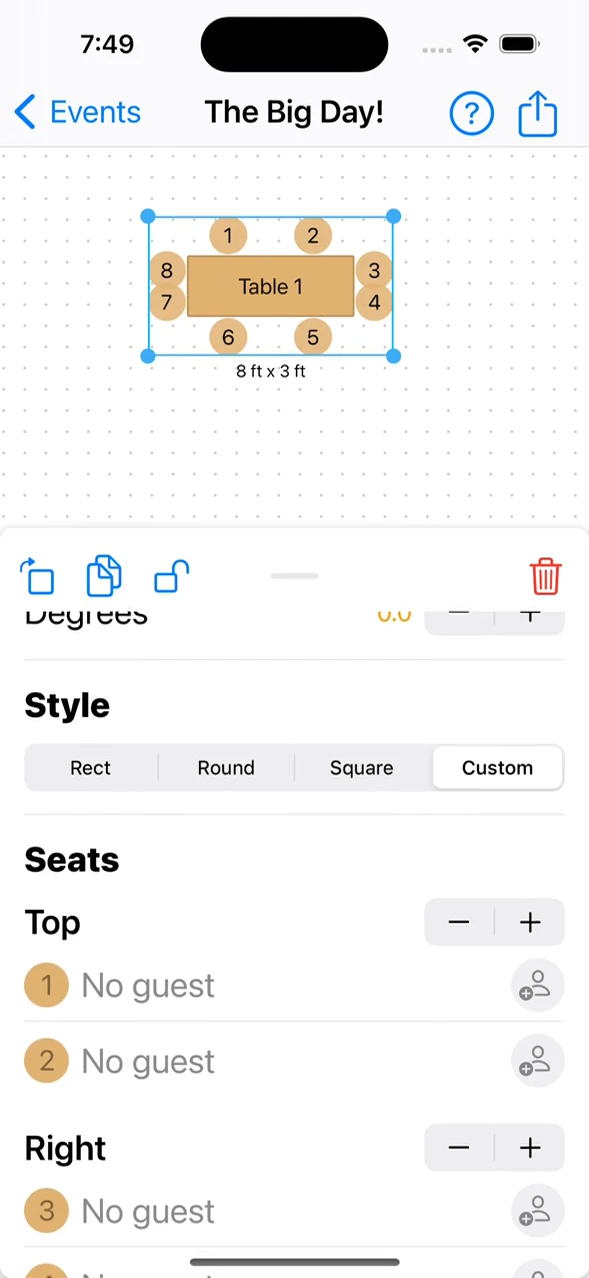
A family dinner, a head table, and a table against a wall need different arrangements. Explore table shapes and use custom seat configurations in the Apple apps to put the right places on the right sides.
Custom seats-per-side controls are documented in the iPhone, iPad, and Mac apps.
- Round and rectangular shapes
- Custom seats on each side
- Flexible head-table arrangements
A little structure. A better event.
Start with the shape. Refine the seats.
Choose the furniture first, then match its seating to how it will be used.
Choose your table style
Use a round, square, or rectangular table for the arrangement you have in mind. Adjust the dimensions to match your furniture.
Set the sides that need seats
In the Apple apps, choose the custom style to specify seats on each side. This is useful for a head table or a table beside a wall.
Place it in the full room
Position the table among the other furniture, assign guests, and review how the seating works with the event layout.
Make it work in your space
Not every table needs seats all the way around.
Small seating choices can make the drawing much closer to the arrangement you actually intend.
A head table with a clear front
For speeches or a focal dining area, you may want everyone facing the rest of the room. Use a custom table configuration with seats on the intended side. Then position the table so its relationship to the other guest tables is clear.
A table beside a wall
A standard arrangement with seats on every side can be misleading when one edge sits against a wall. Set the unused side to have no seats, then review the remaining positions in the context of the room.
Mixed shapes, consistent names
Round and rectangular tables can work together in one floor plan. Give each a clear name or number before assigning guests. Follow the table-style guide to configure the exact seating in the Apple apps, and check the furniture dimensions against your venue’s inventory.
Good questions
Questions about custom table arrangements.
Can I create a table with seats on only one side?
Yes. The custom table style in the iPhone, iPad, and Mac apps lets you specify the number of seats on each side, including leaving sides empty.
Can I resize rectangular tables?
Yes. Rectangular tables support independent width and height changes. Round and square table styles keep a 1:1 aspect ratio.
Can seat numbering start again at each table?
The Apple-app table settings support numbering seats by table rather than consecutively across the whole event. Use the table and seat numbering settings for that arrangement.
Your space. Your people.